Graphics32 defines several functions to support non-uniform lines. This includes gradient lines, dashed lines etc.
The idea is pretty simple: TBitmap32 object holds dynamic array of colors, and a counter, which ‘crawls’ along the array and reads colors from its position. The line drawing algorithm queries color value from the current counter position at each point, then the counter is automatically incremented to get ready to supply the next value to line rasterisation routine.
The counter, accessed through StippleCounter property, wraps itself automatically at the edges of color array. It can move in both directions depending on stipple step, which in turn can be positive or negative. Its value may even be fractional in which case the resulting color is interpolated. The step is accessed with StippleStep property.
The GetStippleColor function returns the color from the current counter position and automatically increments counter position by the counter step, so that next GetStippleColor call will return a color value from the next position.
| Warning |
|---|
| The stipple counter is not thread-aware; It is shared by all threads accessing the bitmap. Additional care should be taken when multiple threads draw stippled lines in the same bitmap. |
Drawing functions that support line patterns have ‘P’ in their postfix (as in LineFSP).
Examples
Drawing a dashed line
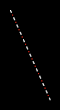
The following code snippet draws a dashed line made up of alternating white dashes and red dots.
// Set up the stipple pattern
Bitmap.SetStipple([clWhite32, clWhite32, clWhite32, 0, 0, clRed32, 0, 0]);
Bitmap.StippleStep := 1; // 1 pixel per color in pattern

// Draw a stippled line
Bitmap.LineFSP(10, 10, 50, 100);
Drawing a gradient line
The following code snippet draws a gradient line. The gradient transitions smoothly from red to blue to yellow.
// Set up the gradient pattern
Bitmap.SetStipple([clRed32, clBlue32, clYellow32]);
Bitmap.StippleStep := 0.1; // Smooth transition

// Draw a gradient line
Bitmap.LineFSP(10, 10, 50, 100);