Get the source code
You can get the latest source code from the Graphics32 Git repository. Either using a Git client to clone the repository or by simply downloading a zip file with the latest snapshot.
- Git: https://github.com/graphics32/graphics32.git
- Zip file: https://github.com/graphics32/graphics32/archive/refs/heads/master.zip
Copy the source code to a location of your choice. In the installation procedures below we use the location C:\Projects\Graphics32 as an example.
Installation procedure for Delphi / C++ Builder / RAD Studio
Note: While the following procedure only mentions Delphi it applies to both Delphi and C++ Builder.
- Start Delphi.
- Add the location of the Graphics32 source to the global library search path.
You can skip this step if you prefer to use per-project library search paths for your own projects. All of Graphics32’s own packages and examples use per-project search paths so they don’t require the source to be in the global search path.- From the menu select Tools→Options…
- Select Language→Delphi→Library.
- Select the Library path field and add the source folder location:
C:\Projects\Graphics32\Source. - Do the above for all the required platforms; Windows 32-bit, Windows 64-bit, etc.
- From the menu, select File→Open project…
- Navigate to the
Grapics32\Source\Packagesfolder and from there open the package folder that corresponds to your version of Delphi.
Note that Delphi 11 and later versions all use the same package files. - Open the
Graphics32_packages.groupprojproject group file.
The project group contains two projects:- The Graphics32 run-time package:
GR32_R - The Graphics32 design-time package:
GR32_D
- The Graphics32 run-time package:
- From the Delphi project manager, activate the Graphics32 run-time package and compile it.
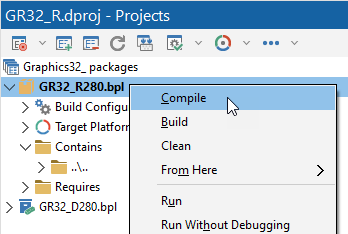
- From the Delphi project manager, activate the Graphics32 design-time package and install it.
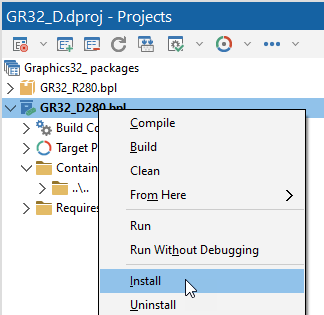
- You should now get a message box notifying you of the package installation and the components it contains:

Installation procedure for Lazarus
The installation procedure for Lazarus is pretty horrible due to deficiencies in the FreePascal compiler or the Lazarus build system.
- Open the
GR32_Lazarusrun-time package. .
Select Recompile clean from the More package toolbar menu.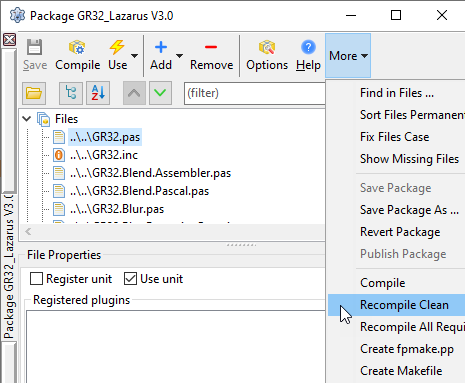
- Compile
GR32_Lazarusagain.
Repeat this 3-4 times until the compile completes without any messages.
- Open the
GR32_DSGN_Lazarusdesign-time package.
Select Use→Install from the package toolbar.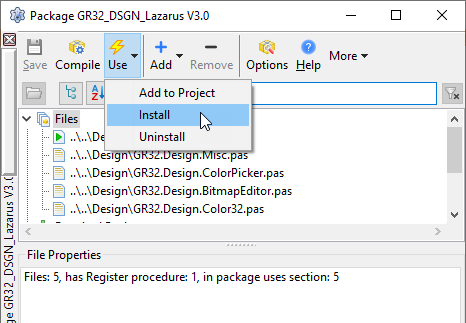
See also: